How to Remove Background from Image Free: Top Tools & AI Techniques (2026)
Remove background from image free online. AI-powered background removal with clean edges, no sign-up, and HD export. Perfect for e-commerce product photos.
Recommended PicFlow tool
Need to optimize images while reading?
Use PicFlow tools to compress, resize, convert, or inspect images directly from your browser.
Use PicFlow Image Compressor
How to Remove Background from Images for Free: The Complete AI Guide
Have you ever taken the "perfect" photo, only to realize the background is a total mess? Maybe there’s a stray trash can in your professional headshot, or your product photo for eBay looks like it was taken in a cluttered basement. We’ve all been there.
In the past, removing a background meant spending hours with the lasso tool in Photoshop, painstakingly clicking around every single hair and corner. It was tedious, frustrating, and usually ended with jagged edges that looked like they were cut out with safety scissors.
But things have changed. Thanks to massive leaps in artificial intelligence, you can now remove background image free in literally seconds. No Photoshop degree required. In this guide, we’re going to walk through the best tools, the smartest techniques, and how you can get professional-grade results without spending a dime.
Why Remove Backgrounds? From E-commerce to Professional Portraits
You might think background removal is just for professional designers, but it’s actually one of the most versatile tools in your digital toolkit.
1. E-commerce Power
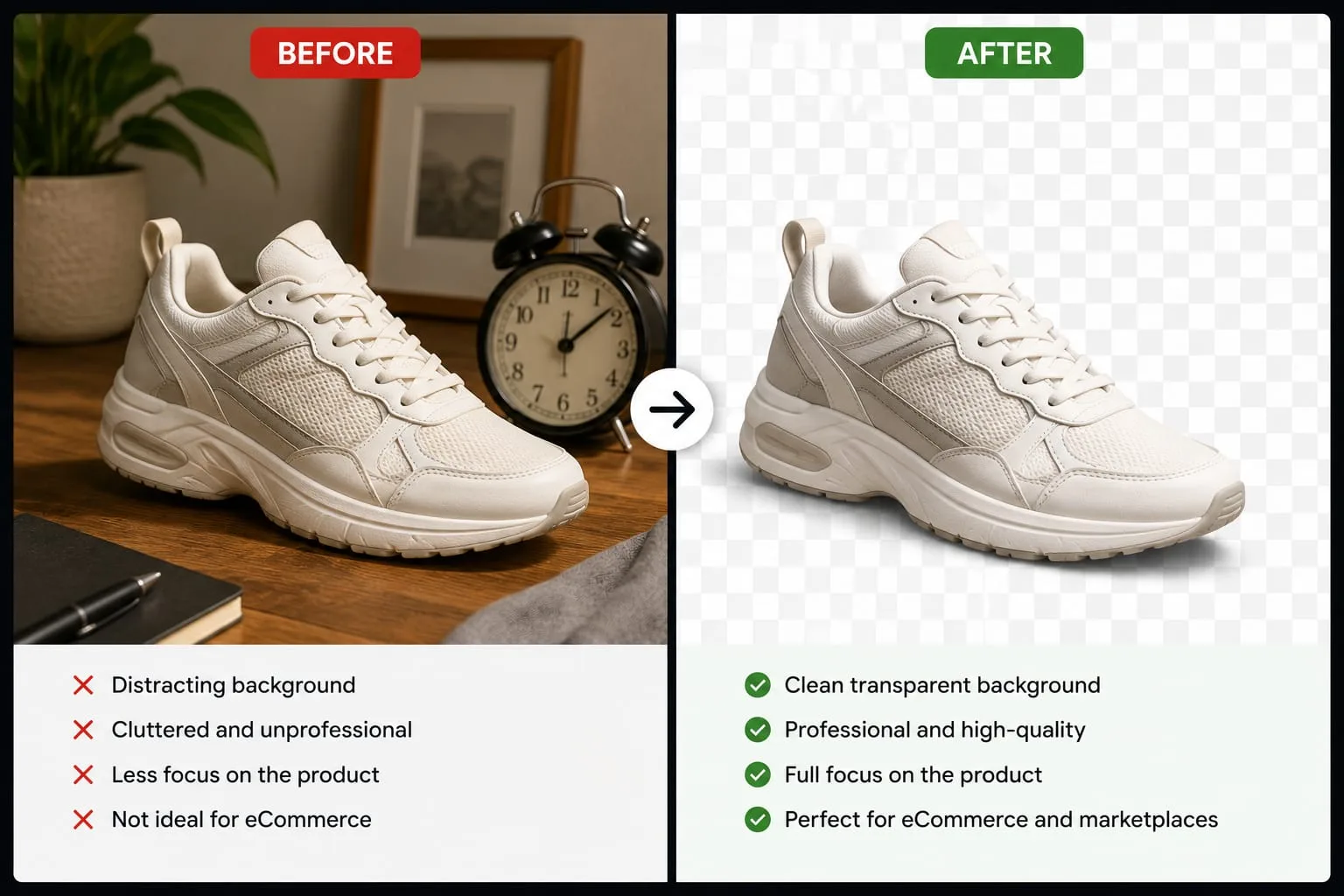
If you’re selling products on Amazon, Shopify, Etsy, or Facebook Marketplace, your background matters. A clean white or transparent background makes your product stand out, builds trust, and creates a more professional appearance.
Studies consistently show that products displayed on clean backgrounds receive higher engagement and better conversion rates.
2. The Perfect Profile Picture
Whether it’s for LinkedIn, your company website, or a social media profile, you want the focus on you—not the distracting furniture, wallpaper, or clutter behind you.
Removing the background and replacing it with a clean gradient, studio backdrop, or solid color can instantly transform an ordinary snapshot into a professional portrait.
3. Creative Design and Collages
Want to place yourself on a tropical beach, create a YouTube thumbnail, design marketing materials, or build a digital collage? Background removal is often the very first step.
Once the background is removed, you can place subjects onto any scene or design you can imagine.
How to Remove Image Backgrounds Online for Free (Step-by-Step with PicFlow AI)
Most people assume they need expensive software, but modern AI tools work directly in your browser.
Here's how to use PicFlow AI's Background Remover:
- Upload Your Image: Drag and drop your image into the upload area.
- Let the AI Work: The neural network automatically identifies the subject and separates it from the background.
- Refine if Needed: Use touch-up tools to clean up any areas requiring extra precision.
- Download in HD: Export your finished image as a high-resolution PNG with a transparent background.
Top 3 Free Tools for Background Removal
PicFlow AI
Best for overall quality, accuracy, and ease of use.
Offers HD exports and does not require complicated setup.
Adobe Express
Great for users already working inside Adobe's ecosystem.
Provides professional editing features but often requires account registration.
Remove.bg
Known for fast processing and simplicity.
Very quick results but free exports may have limitations.
Tips for Getting the Perfect Transparent Background Every Time
Want your images to look like they came straight out of a professional studio? Follow these tips.
Handling Curly Hair and Complex Edges
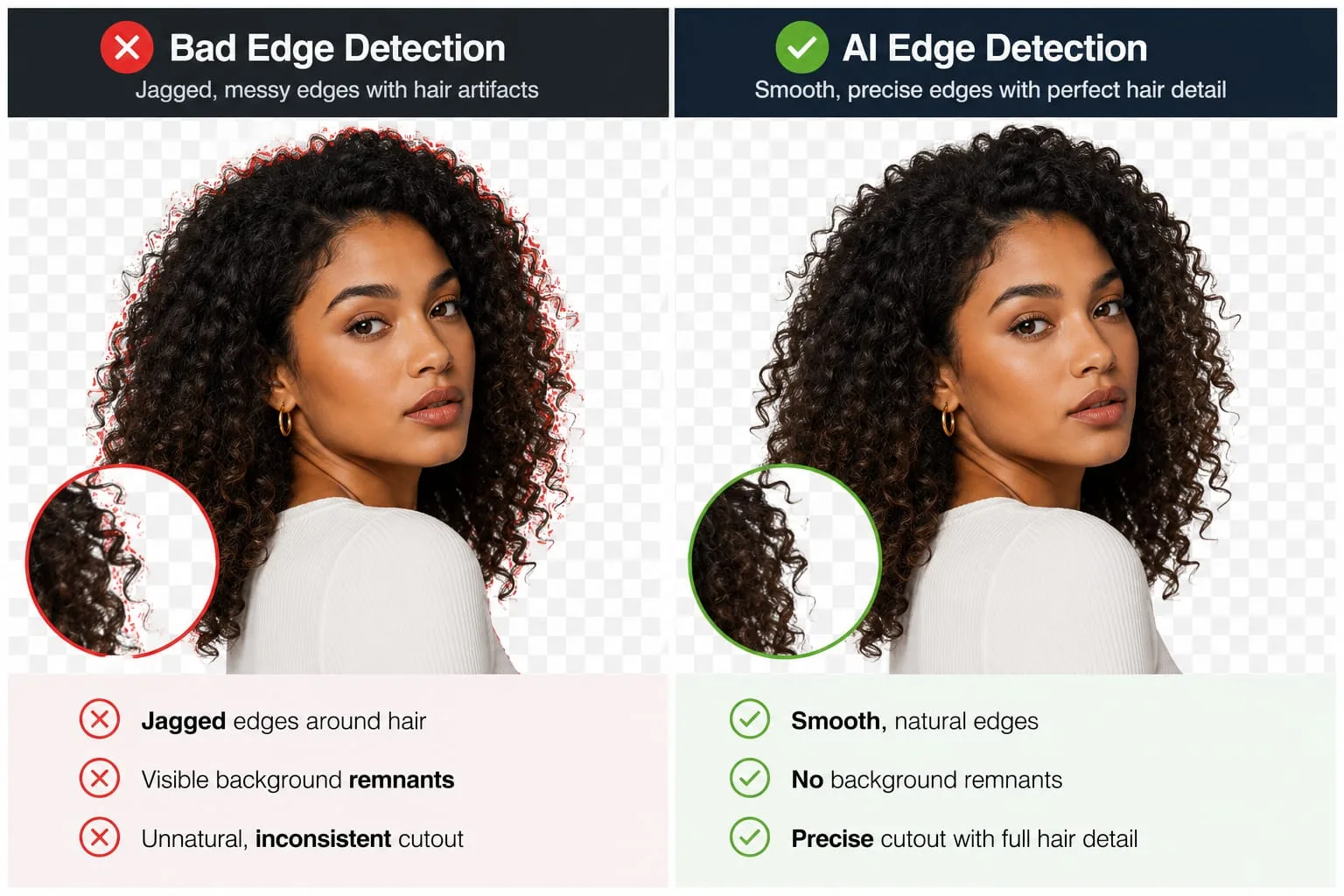
Hair is one of the hardest things for background removal systems to process accurately. Curly hair, flyaway strands, fur, and feathers can create difficult edges.
When using an AI background remover free, zoom into the hairline and inspect the edge quality. If the edges appear too sharp or artificial, use edge refinement tools to soften the transition.
Dealing with Transparent Objects
Glasses, water bottles, windows, and transparent packaging can challenge lower-quality background removal tools.
Advanced AI systems use transparency-aware segmentation that preserves glass and translucent materials while still removing the background behind them.
Bulk Background Removal: A Game Changer for E-commerce Sellers
If you manage an online store, processing hundreds of product photos one by one simply isn't practical.
That's why many sellers use tools that can remove background bulk free across entire folders of images.
Bulk processing helps:
- Create a consistent product catalog.
- Save hours of manual editing.
- Maintain a professional brand appearance.
- Speed up new product launches.
Upload a folder, let the AI process the images automatically, and download the finished files ready for your store.
Why PicFlow AI's Background Remover Stands Out
Many free tools prioritize speed but sacrifice quality. Others produce smooth but unnatural-looking edges.
PicFlow AI focuses on balancing both.
Our AI-powered edge detection preserves:
- Hair texture
- Fabric details
- Fur and feathers
- Complex object boundaries
This creates a more natural cutout without the plastic-looking edges commonly seen in lower-quality solutions.
We also prioritize privacy and secure image processing. Your images remain yours.
FAQ
How can I remove the background of an image for free?
The easiest method is to use an AI-powered online tool such as PicFlow AI. Upload your image, allow the AI to identify the subject, and download the transparent PNG.
What is the best free AI background remover?
PicFlow AI is one of the strongest options because it combines fast processing, high-quality cutouts, and HD exports without requiring complicated software.
How do I make an image background transparent without Photoshop?
Use a transparent background maker online. Modern AI tools automatically create a transparent PNG by separating the foreground subject from the background.
Can I remove the background from a photo on my phone?
Yes. Most modern AI background removers are mobile-friendly and work directly from your browser on iPhone and Android devices.
How do I remove backgrounds from multiple images at once?
Look for a bulk processing feature. This allows you to upload many images simultaneously and apply the background removal process to all files in one batch.
Conclusion
Whether you're building an online store, creating content, designing graphics, or simply improving your online presence, the ability to remove background image free is incredibly powerful.
What once required hours of manual editing can now be accomplished in seconds using AI.
Experiment with different images, try different backgrounds, and discover how much more professional your projects can look when the focus stays exactly where it belongs: on the subject.
Ready to clean up your photos? Try the PicFlow AI Background Remover and get high-quality transparent backgrounds in seconds.
Frequently asked questions
What is the main takeaway from How to Remove Background from Image Free: Top Tools & AI Techniques (2026)?
The guide explains practical image optimization steps that can help improve file size, loading speed, visual quality, and publishing workflows.
Can I use PicFlow tools while following this guide?
Yes. PicFlow includes browser-based tools for compression, resizing, conversion, metadata checks, background removal, and other image workflows.
Does image optimization help SEO?
Yes. Smaller, correctly sized images can improve page speed and Core Web Vitals, which supports better user experience and search performance.
Which image format should I use for websites?
WebP and AVIF are often efficient for websites, while JPG is widely compatible for photos and PNG is useful when transparency is needed.
Does PicFlow upload my images?
PicFlow is built around privacy-first browser workflows where supported, with processing handled for the action you request.