How to Detect If a Photo Has Been Manipulated: The Digital Detective's Guide
Learn how to detect image manipulation using free tools and forensic techniques. From Error Level Analysis to metadata inspection — verify photos like a pro.
Recommended PicFlow tool
Need to optimize images while reading?
Use PicFlow tools to compress, resize, convert, or inspect images directly from your browser.
Use PicFlow Image Compressor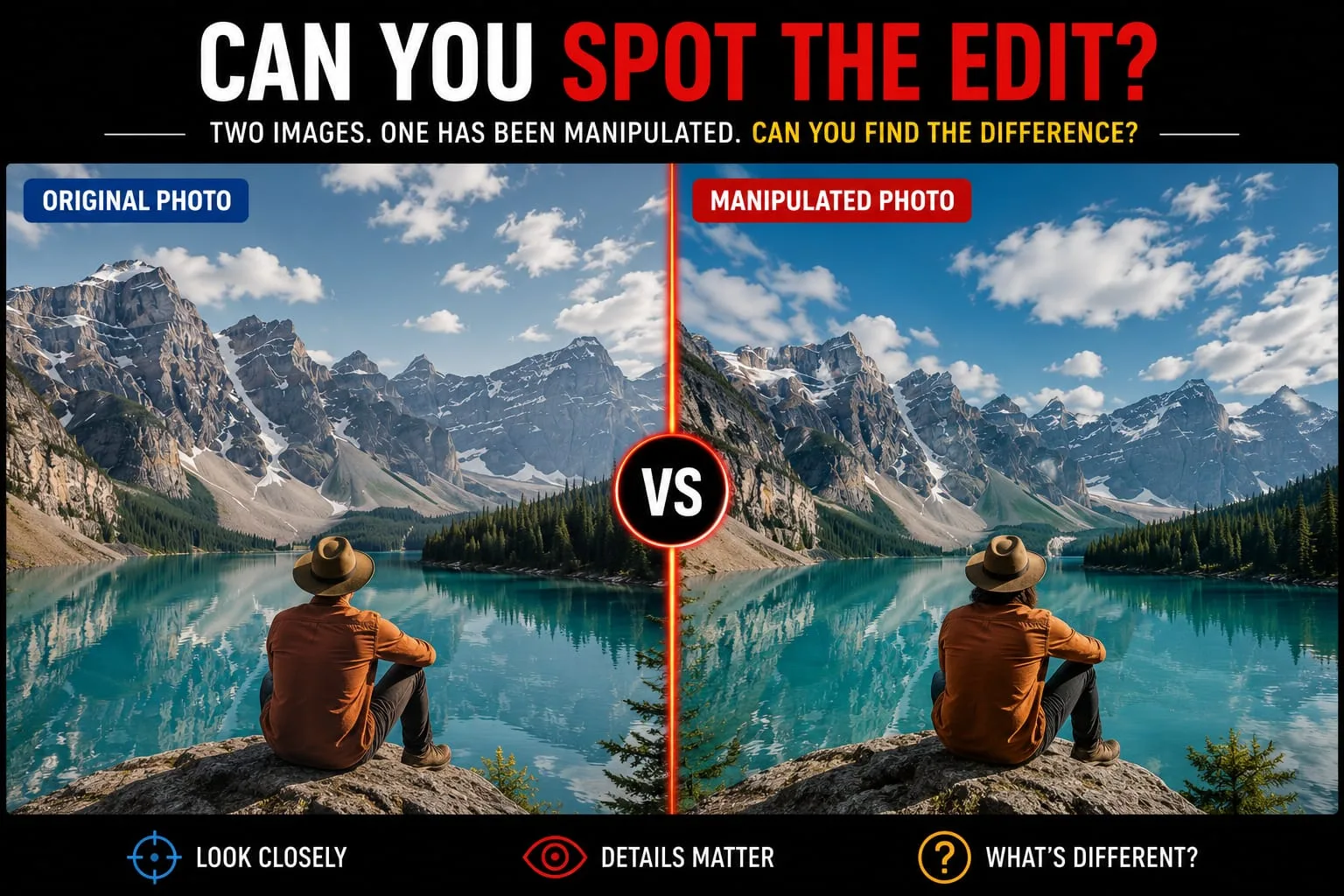
We live in an age of visual abundance, but also visual deception. With the rise of sophisticated editing software and generative AI, the phrase "seeing is believing" has never been more outdated. Whether it’s a politically charged deepfake, a misleading product advertisement, or a tampered legal document, the ability to detect image manipulation is becoming a critical skill for journalists, investigators, and everyday digital citizens.
In this guide, we will take you inside the world of digital forensics. You’ll learn the professional methods used to spot photoshopped images, how to analyze hidden metadata, and how to use advanced tools like Error Level Analysis, also known as ELA, to find the truth hidden in the pixels.
Why Image Manipulation Detection is More Critical Than Ever
In the past, spotting a fake photo was relatively easy. You looked for jagged edges, inconsistent lighting, or obvious ghosting around a subject. But today, the tools are too good for simple visual checks.
The stakes of visual misinformation have never been higher. A single manipulated image can sway an election or ruin a reputation in minutes. Understanding photo manipulation detection allows us to move from passive consumption to active verification. By learning the tells of digital forgery, we can maintain the integrity of our digital world.
Error Level Analysis Explained: Spotting the Invisible Edits
The most powerful weapon in the digital forensic arsenal is Error Level Analysis, often shortened to ELA. To understand ELA, you first have to understand how JPEG compression works. Think of it like paper folding; every time you save a JPEG, you fold the data again.
The Science of Compression
When you save an image as a JPEG, the software simplifies the data to save space. If an image is original and has never been edited, the error level, or the amount of compression noise, will be mostly uniform across the entire photo.
The Forensic Aha Moment
When someone edits an image, such as adding a person to a crowd, they are taking a piece of one image and pasting it into another. When that new image is saved, the original parts may have been compressed more times than the newly added part.
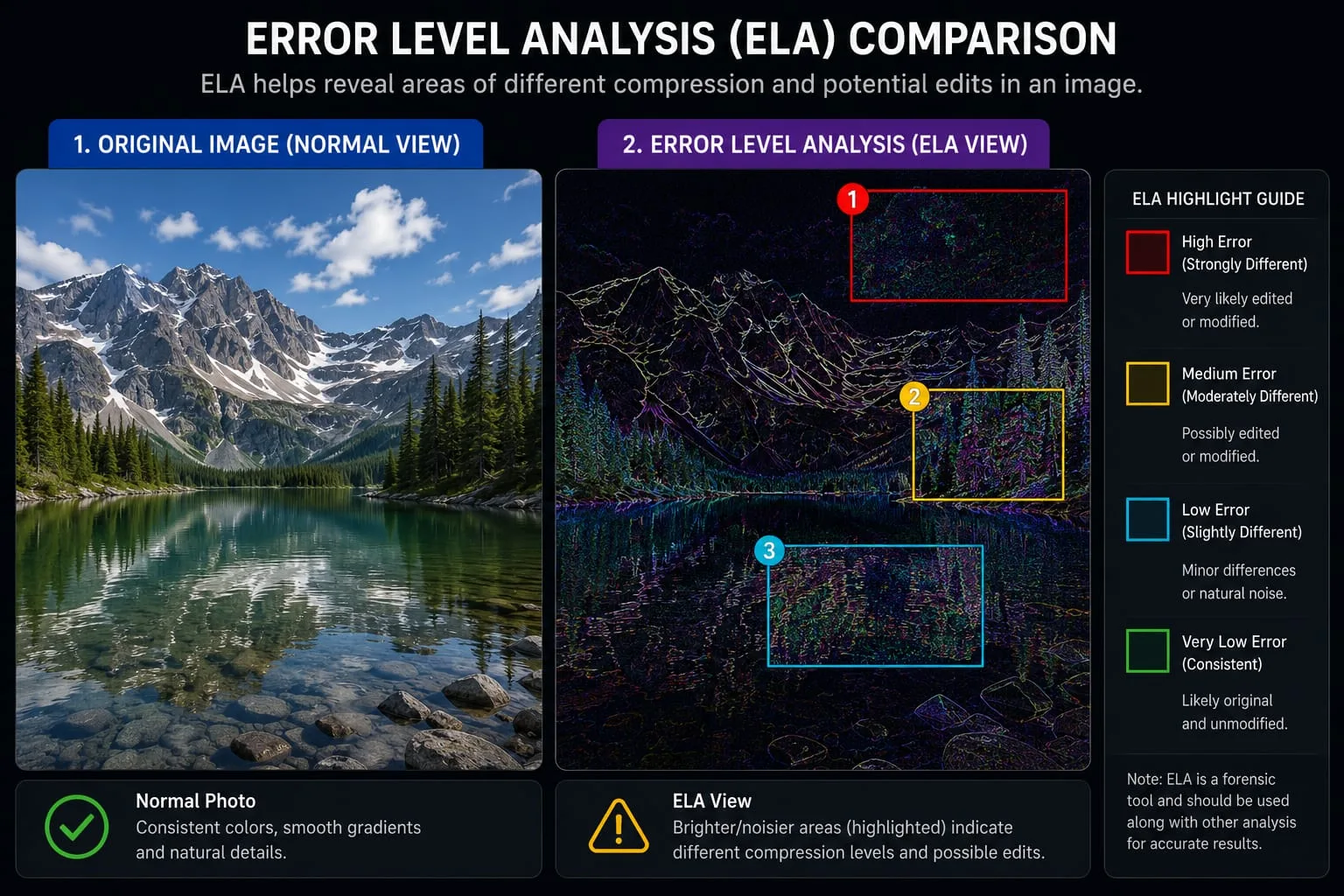
An image forensics tool using ELA highlights these differences. Tampered areas may appear much brighter or show a different texture in the ELA heatmap.
Metadata Forensics: What Hidden EXIF Data Reveals About a Photo
Before you even look at the pixels, you should look at the metadata. Every digital photo contains a hidden digital birth certificate called EXIF data.
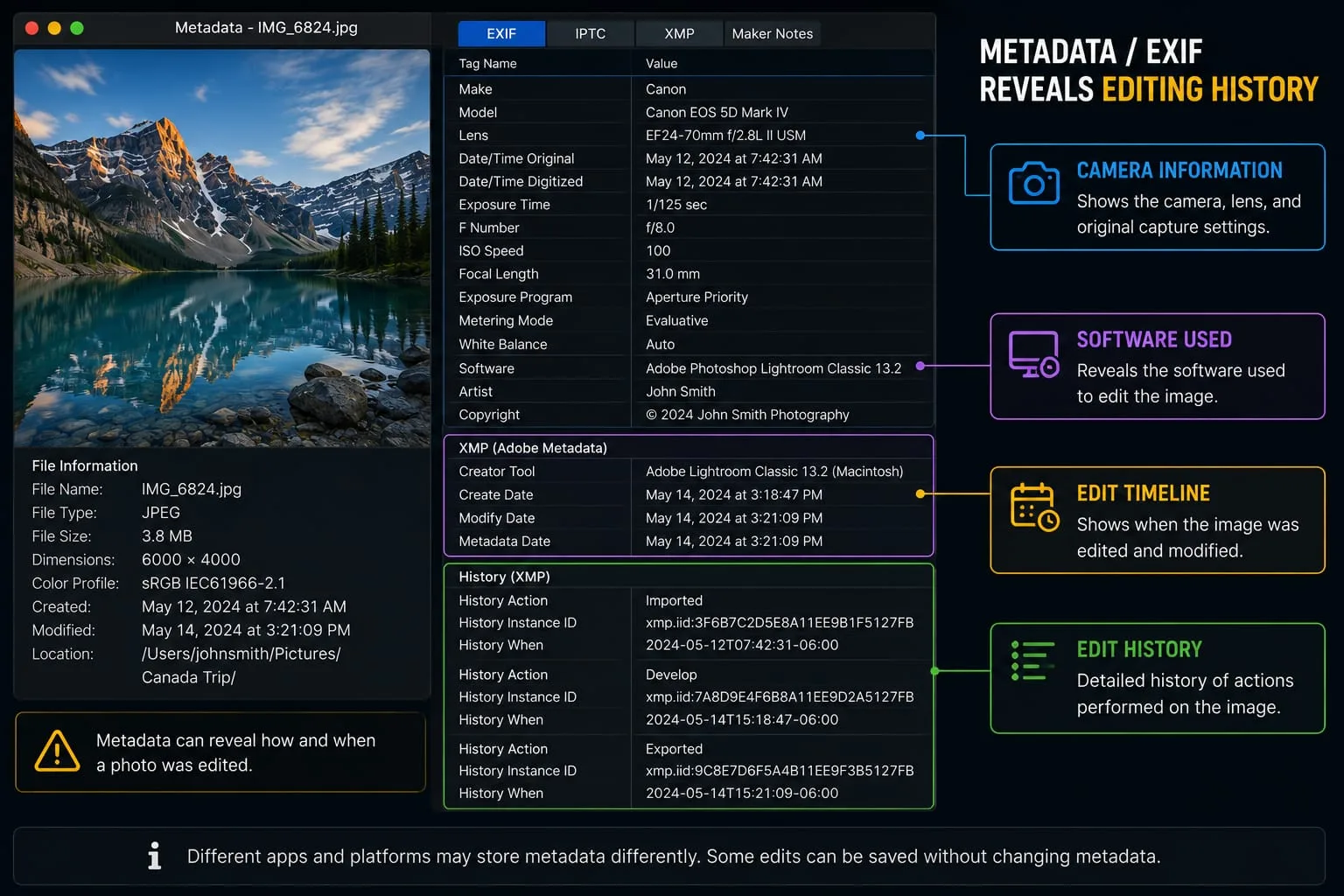
What EXIF Data Tells You
- The Device: The exact camera or smartphone used to capture the image.
- The Software: If the image was saved by Adobe Photoshop, GIMP, or another editor, that software name may appear in the metadata.
- The Timestamp: When the photo was taken compared with when it was last modified.
If someone claims a photo is a raw camera shot, but the metadata says it was last saved in Photoshop, you have found your first clue.
How to Spot Clone and Healing Brush Manipulation
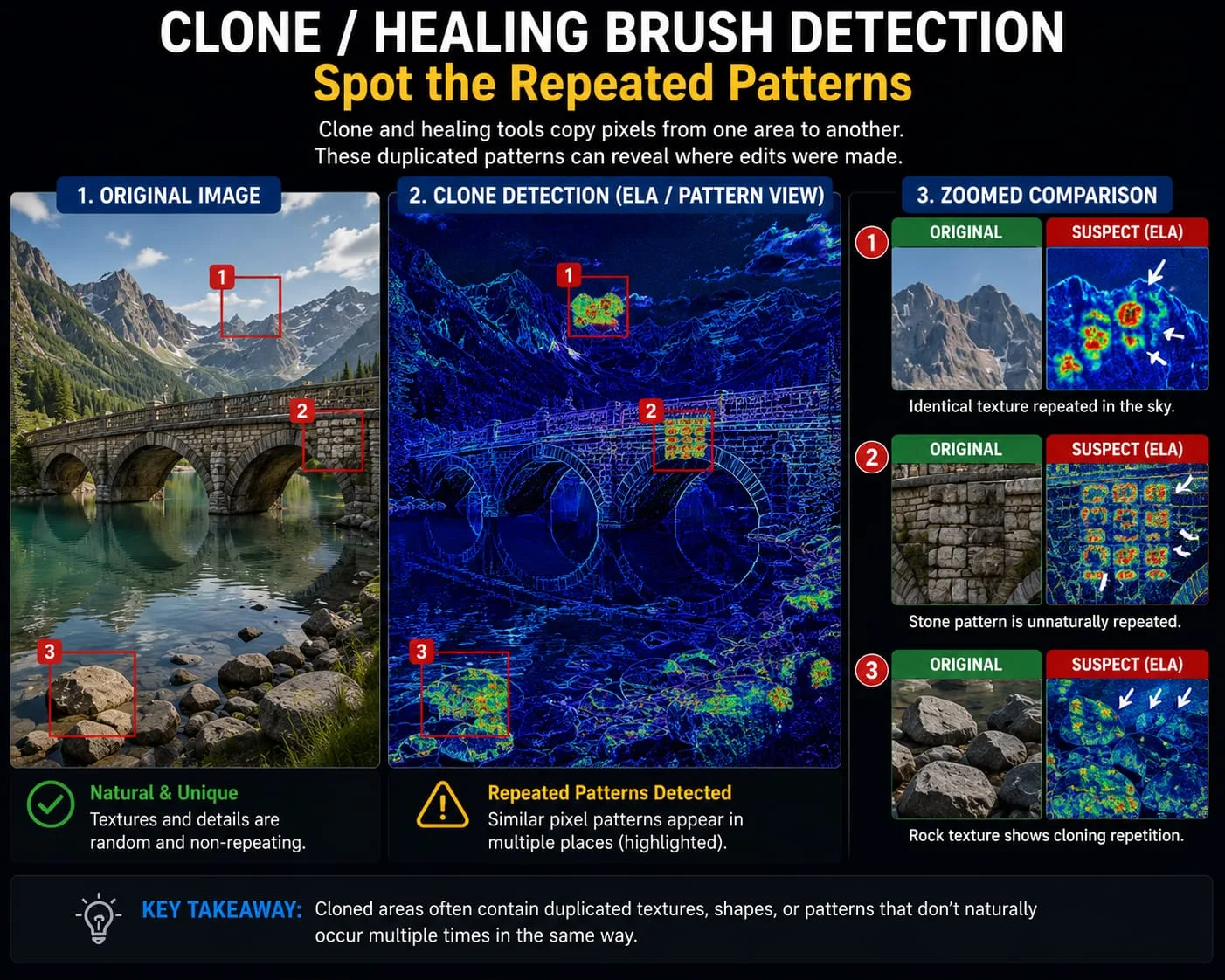
One of the most common ways to hide something in a photo is cloning. This means copying pixels from one part of the image and pasting them over another, like covering a stain on a shirt with a clean patch of fabric.
Detecting the Echo
While the human eye might see a perfectly uniform lawn, a forensic check looks for clone detection image patterns. In nature, no two areas are exactly the same. If you see a repeating pattern of clouds, grass, bricks, or skin texture, you may be looking at the work of the Clone Stamp or Healing Brush tool.
Lighting and Shadow Analysis: Using Physics to Detect Fakes
AI and Photoshop can fake pixels, but they often struggle to fake the laws of physics. You can spot edited photos by looking carefully at the interaction between light and objects.
The Vanishing Point Check
In a real photo, shadows should follow a consistent light source. If two people are standing next to each other, but the light catch in their eyes appears in different positions, such as one at 2 o’clock and the other at 10 o’clock, the light sources may not match. That can suggest the image is a composite.
Shadow Continuity
Look at where the shadows meet the objects. AI and poor edits often fail to render contact shadows properly. These are the dark, thin areas where an object touches the ground or another surface. If an object looks like it is floating, it may be a sign of a bad paste job.
Using PicFlow AI for Quick Image Verification and Forensic Checks
At PicFlow AI, we provide tools for fake photo detector verification. Our suite allows you to inspect images faster and more confidently.
- Peek into Metadata: View hidden EXIF data to understand the true origin of a file.
- Zoom without Blur: Use AI-powered upscaling to inspect the seams of a manipulation without traditional pixelation.
- Analyze Pixel Structure: Determine whether an image was captured by a lens, edited manually, or generated by an algorithm.
By combining forensic logic with PicFlow AI’s smart analysis, you can bridge the gap between a suspect image and a verified truth.
The Future of Authenticity: AI Detection vs. Digital Forgery
The battle between forgers and digital detectives is an arms race. As AI becomes better, verification methods must also improve. Detectives are increasingly turning to content provenance standards, such as C2PA, to digitally sign images at the source.
Until that becomes standard, your best defense is a healthy dose of skepticism and a professional image forensics tool.
FAQ: Frequently Asked Questions
1. How can you tell if an image has been manipulated?
Look for visual red flags like mismatched shadows, repeating patterns, unnatural edges, or strange object placement. Then analyze the EXIF metadata for editing software signatures and use ELA to find compression inconsistencies.
2. What is Error Level Analysis in photo forensics?
Error Level Analysis is a technique that identifies different levels of compression in an image. Tampered areas often have a different compression history and may show up as bright spots or inconsistent textures on an ELA heatmap.
3. Can you detect if an image was photoshopped for free?
Yes. Some online forensic tools and analysis features within PicFlow AI can help you inspect metadata, compression patterns, and visual inconsistencies for free.
4. How do I check the metadata of an image to see if it is real?
Use a metadata or EXIF viewer to inspect the file. Look at fields such as software, modify date, device model, camera settings, and location data. If the software field shows an editor like Photoshop, that may indicate the file was modified.
5. Is there an AI that can detect photo manipulation?
Yes. Modern AI tools can be trained to recognize subtle noise patterns, compression artifacts, and structural inconsistencies left behind by human editors or AI generators.
6. What are the most common signs of a fake photo?
The most common signs include inconsistent lighting and shadows, repeating pixel patterns, unnatural edges, missing or mismatched metadata, and objects that appear pasted into the scene.
Conclusion
Becoming a digital detective is about moving from emotion to analysis. Stay curious, stay skeptical, and always verify before you share.
Building a Verification Workflow
For professionals who deal with images regularly, such as journalists, investigators, legal professionals, and content teams, a standardized verification workflow is essential.
- Source Check: Where did the image come from? Is the source reputable?
- Metadata Scan: Run the file through an EXIF viewer to check for editing history.
- ELA Test: Apply Error Level Analysis to look for compression inconsistencies.
- Physical Analysis: Examine lighting, shadows, and vanishing points for physics violations.
- Tool Verification: Use an AI-powered tool to get a probabilistic authenticity score.
By following this consistent workflow, you reduce the chance of being fooled by even the most sophisticated manipulations. Tools like PicFlow AI can help automate several of these steps, turning a long manual investigation into a much faster verification process.
Frequently asked questions
What is the main takeaway from How to Detect If a Photo Has Been Manipulated: The Digital Detective's Guide?
The guide explains practical image optimization steps that can help improve file size, loading speed, visual quality, and publishing workflows.
Can I use PicFlow tools while following this guide?
Yes. PicFlow includes browser-based tools for compression, resizing, conversion, metadata checks, background removal, and other image workflows.
Does image optimization help SEO?
Yes. Smaller, correctly sized images can improve page speed and Core Web Vitals, which supports better user experience and search performance.
Which image format should I use for websites?
WebP and AVIF are often efficient for websites, while JPG is widely compatible for photos and PNG is useful when transparency is needed.
Does PicFlow upload my images?
PicFlow is built around privacy-first browser workflows where supported, with processing handled for the action you request.